
Local Networks
Configure the local networks consist of wired LAN Ethernet and wireless Wi-Fi hotspots.
Do not click the "Delete" and "Stop" buttons on the LAN interface, as it will immediately halt the DHCP server and all intranet network streams on LAN ports and Wi-Fi connections.
Physical LAN Port
The physical LAN port on the EZR35-LTE router is the RJ45 PoE&LAN port. While connecting it to a PoE injector, it outputs Ethernet signals to the LAN port on the PoE injector. Check more on the PoE connections.
Logical LAN Interface
The outdoor router's logical LAN interface controls the local intranet, bridging the physical LAN port and the wireless Wi-Fi hotspots.
The LAN interface utilizes a static IP address and operates a DHCP server to assign IP addresses to client devices. It should be configured as a bridge (br-lan) to combine multiple physical interfaces into a single logical network.
Local Intranet Settings
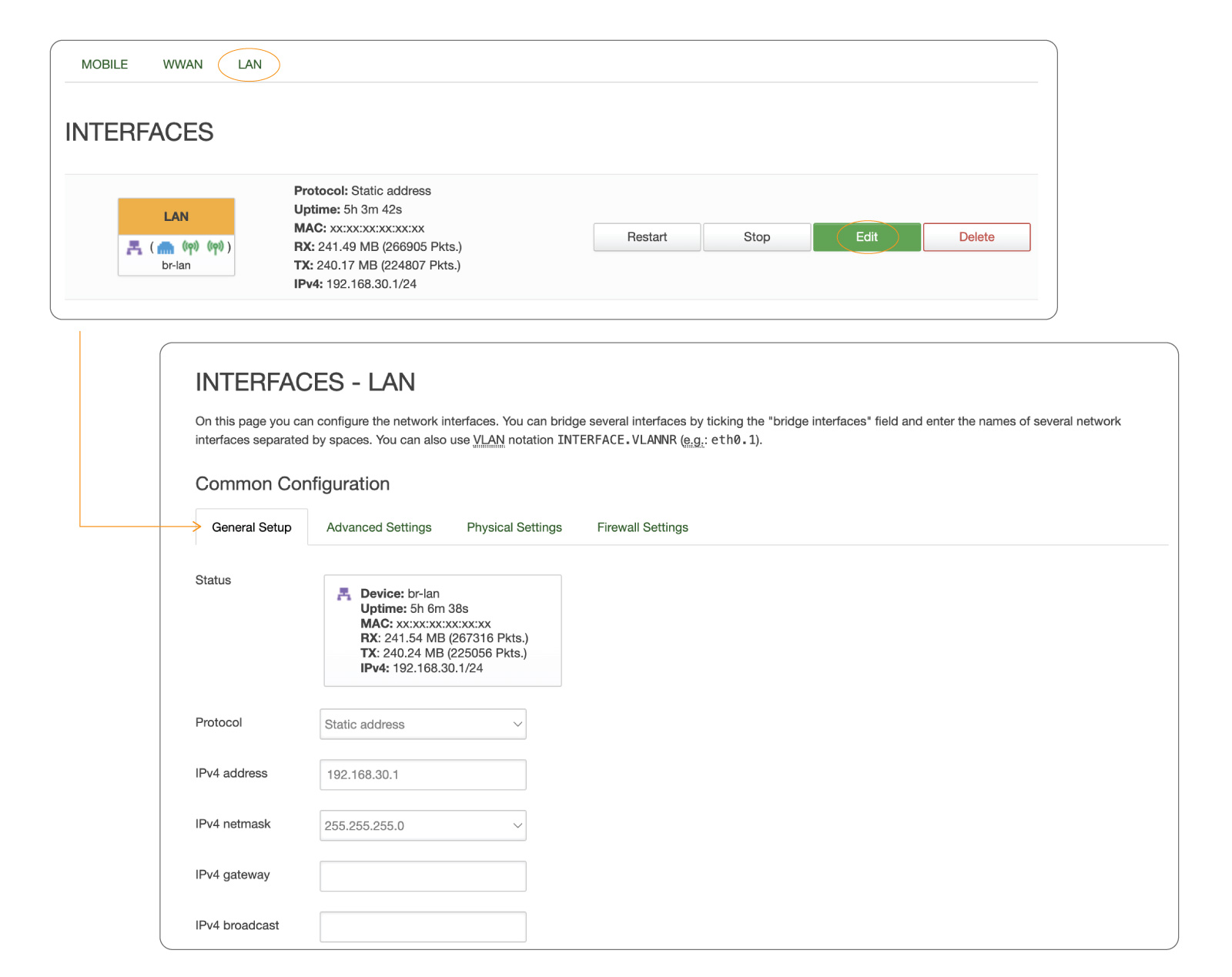
To modify the local network settings, go to "Network > Interfaces" and click the "Edit" button for the LAN (bar-lan) interface, or click the "LAN" tab in the top navigation bar.
General IP Settings
Under the "General Settings" tab, we can modify the router's IP address, subnet mask, default gateway, and broadcast address.
Protocol
Static Address
The LAN interface should use the default value of "Static Address."
IPv4 Address
192.168.30.1
The IP address of the router and gateway for its intranet network.
IPv4 Netmask
255.255.255.0
Netmask is used to define how "large" the LAN network is.
IPv4 Broadcast
192.168.30.255
DHCP clients use broadcast to find and send requests to their respective servers.
DHCP Server
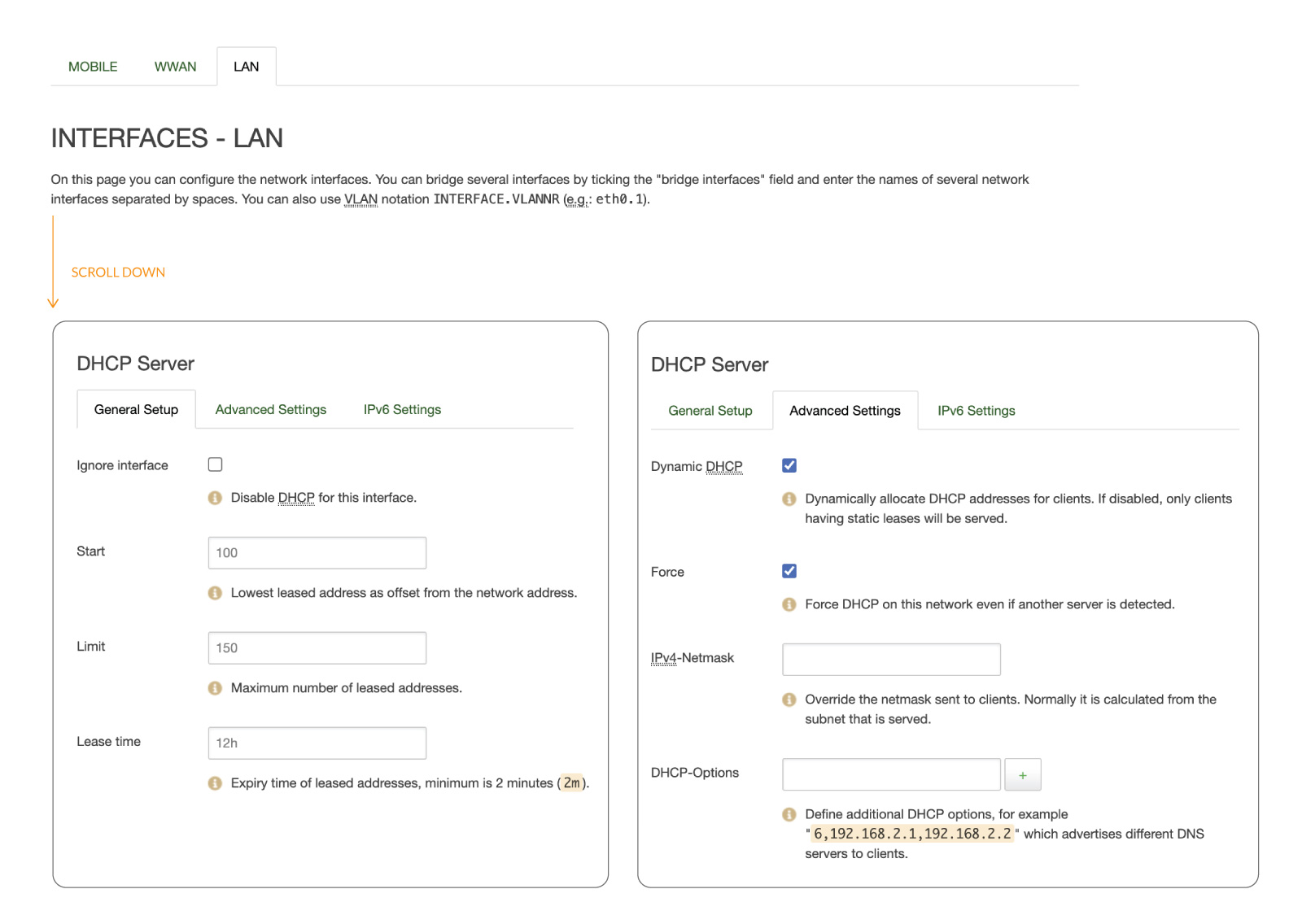
Scroll down to the "DHCP Server" section, and under the primary "General Setup" tab, we can modify the DHCP IP pool and the DHCP lease period.
The DHCP server can automatically configure connected devices' TCP/IP settings and assign an IP address from the available IP pool. To disable the DHCP server, select the "Ignore Interface" checkbox under the General Setup tab.
Start
100
The start IP of the DHCP IP pool.
For example, if the 5G router’s LAN IP is 192.168.30.1 with a netmask of 255.255.255.0, a valid IP address should start from 192.168.30.100.
Limit
150
Define the IP addresses the DHCP server can lease out.
Continuing from the above example, if the start address is 192.168.30.100 and the server can lease 150 addresses, the available addresses will range from 192.168.30.100 to 192.168.30.249.
Lease Time
12 Hours
The duration of an IP lease. Leased-out addresses will expire after the specified period, and you must request a new DHCP lease.
If the device stays connected, its lease will be renewed after half the specified time has passed.
For example, if the lease time is 12 hours, the device will send a DHCP lease renewal request every 6 hours.
The lease time can be set in hours (h) or minutes (m). The minimum time that can be specified is 2 minutes (2m).
Advanced DHCP Settings
Under the Advanced Settings tab, you can configure the DHCP server further.
Dynamic DHCP
Enable
This option enables the dynamic allocation of client addresses. If you disable it, you must input a static IP address on the connected devices.
Force
Disable
The force function ensures that the router always starts its DHCP server, even if another DHCP server is already running in the router’s network.
IPv4 Netmask
NA
It overrides the LAN netmask, making the DHCP server think it’s serving a larger or smaller network than it is.
DHCP Options
NA
For example, you can assign an MTU value per DHCP with "26,1470" or "option:mtu, 1470". You can add more options by clicking the plus symbol next to the field.
Static Leases
To check the active DHCP clients and add new static leases, click "Network > DHCP and DNS" and navigate to the "Static Leases" tab.
Static IP leases reserve specific IP addresses for particular devices by binding them to their MAC addresses. It is useful when a stationary device connected to the network needs to be accessed frequently, such as a NAS, printer, or camera.
Hostname
NA
A custom name that describes a linked device.
MAC Address
NA
MAC address of the linked device.
IPv4 Address
NA
The desirable IP address is reserved for the specified device.
Lease Time
NA
Use "infinite" to lock the lease permanently.
Last updated