
Insert SIM Cards
The outdoor 4G router uses Nano (4FF) SIM card to connect to mobile internet networks.
Preparations
Use a Nano-size SIM card (12.3 x 8.8 mm) in the router. If it's a new SIM card, please follow the provider's instructions to activate it before inserting it into the router.

Please always turn off the power while inserting or removing the SIM card. Please use an unlocked and activated SIM card.
Insert A SIM Card
Turn off the router power before inserting or removing a SIM card.
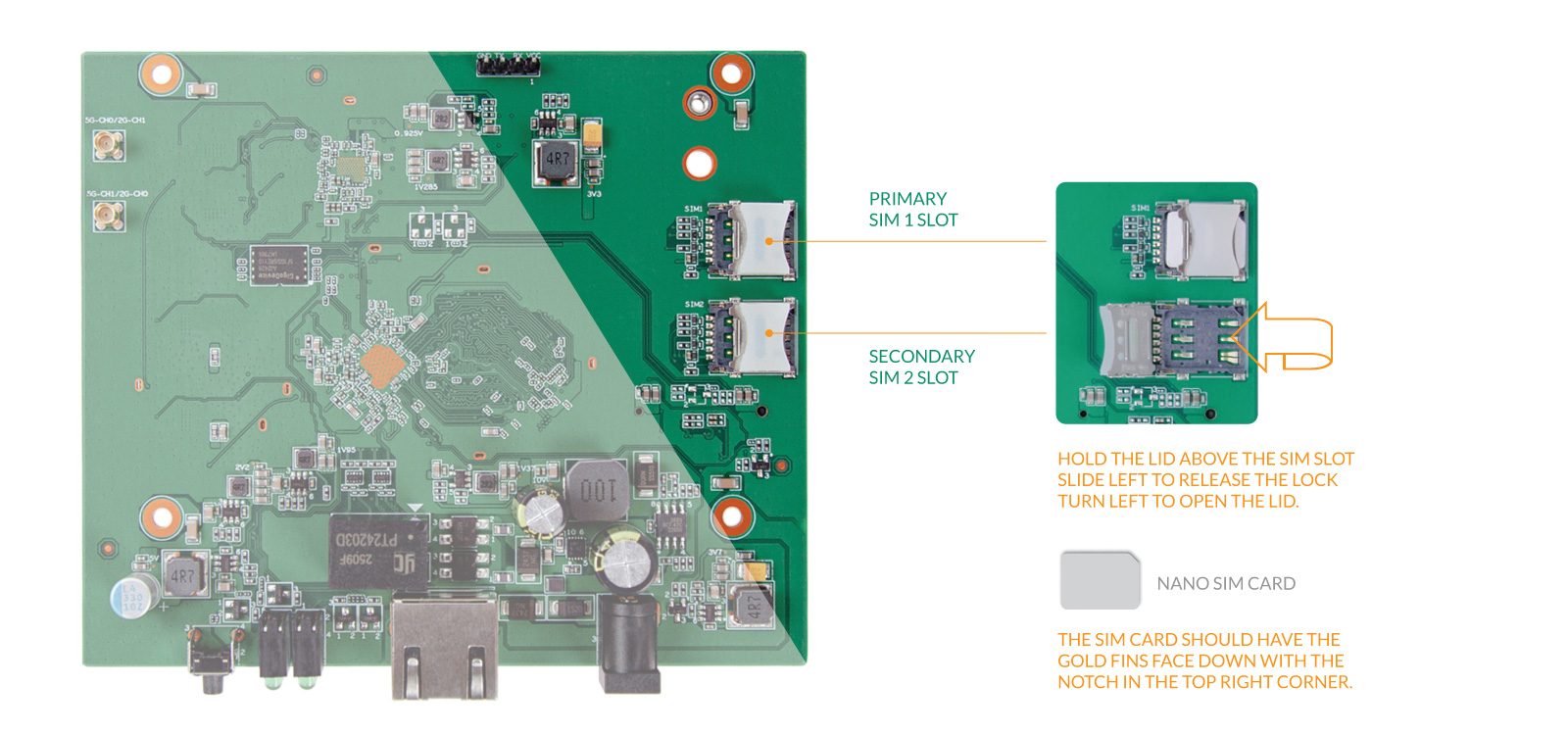
Locate the SIM1 and SIM2 slots in the top right corner of the motherboard.
Hold the lid of the SIM card slot and slide it to the left to open the cover.
Put a Nano SIM card in the SIM1 slot. There is only one correct way to insert the SIM card: the gold pins should face down, and the notch should be in the top-right corner.
Cover the SIM lid, then slide right to lock it.
Check and Clean the SIM Card
If the router cannot detect the SIM Card:
First, confirm that the SIM card is already activated and has enough data allowance.
Then check whether the SIM card is inserted with the correct orientation and fully seated in its slot. The golden contacts should face down.
After that, inspect the SIM card's gold contact points to ensure they are clean and free of damage. If you notice any dust or dirt on the gold contacts, gently clean them with a soft, dry cloth or eraser.
Last updated